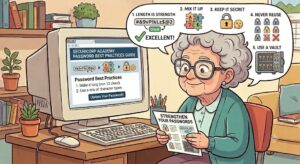
For seniors, the best password strategy balances strong security with everyday usability. Security experts recommend using long, easy-to-remember passphrases or a password manager rather than relying on short, complex passwords that are difficult to recall.
Creating Strong Passphrases:
Passphrases are mini-sentences that combine length (the best defense against hackers) with words that are easy for you to remember.·
Use the Sentence Method: Think of a random, meaningful sentence and use the first letter of each word. For example, the phrase “My favorite vacation was to Tennessee in 2010!” becomes MfvwtTi2010! ·
Combine Unrelated Words: Pick 4 to 5 random words that mean nothing to anyone else but are easy for you to picture. For example: Purple-Horse-Guitar-Ocean. ·
What to Avoid: Never use easily discoverable information like your name, grandchildren’s names, birthdays, or street numbers. Hackers can easily find this information on public social media accounts.·
Managing and Remembering Logins:
It can be overwhelming to remember dozens of different logins. Consider these approaches to keep them organized:·
Use a Password Manager: Password managers store all of your logins in one secure digital “vault,” which you can access by remembering only one master password. Some phones and computers have built-in password apps (such as the Passwords app on iPhones) that can securely store and generate your logins. ·
Write Them Down Securely: While it is generally advised against, many older adults find that manually writing down passwords works best. Experts note this is acceptable only if you use compensating controls. Keep your notebook or password journal in a highly secure place, such as a locked desk drawer or a home fire safe—never on a sticky note attached to your computer monitor. ·
Consider Passkeys: Many modern devices and websites allow you to use “passkeys,” which let you log in using your device’s fingerprint, face scan, or PIN instead of typing a password.
Securing Your Accounts:
Just having a good password isn’t enough to fully protect your personal information.·
Turn on Two-Factor Authentication (2FA): 2FA provides an extra layer of security. Whenever you log in to banking, email, or shopping, it requires both your password and a temporary, one-time code sent directly to your phone or email.·
Never Share Passwords: Do not share your login information with friends or family. If a friend’s account is compromised, your shared password could give hackers access to your personal information.·
Plan for Digital Legacy: Make sure you have a plan in place so that a trusted relative can access your online accounts and manage digital assets if you pass away.
https://www.aaepa.com/2020/02/best-practices-for-passwords/